Remote Access
You can access the LTE router remotely in several ways once it is connected to the internet. The most convenient method is through the integrated Traversal Cloud; alternatively, you can set up DDNS or install other remote access plugins for remote access.
Ezencloud
Section titled “Ezencloud”EzenCloud is our latest cloud management platform, featuring advanced tools and contemporary functions to easily manage multiple routers via a web CLI and SSH terminal.


Web Accessing and SSH Terminal
Runtime and WiFi Hotspot Status
Template & Firmware Deployments
The Traversal Cloud feature has been removed from Router xx62 and subsequent versions, with Ezencloud adopted as the replacement for remote management. Ezencloud facilitates the management of multiple routers and provides Web Access and SSH functionalities.
For the specific setup steps of Ezencloud, you can refer to Ezencloud Manual.
Traversal Cloud
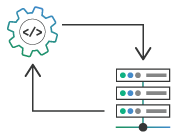
Section titled “Traversal Cloud”Traversal Cloud is our initial cloud platform designed for legacy firmware. It is a dedicated NAT tunneling tool that enables secure remote access without needing a public IP address and allows you to access the router’s web interface.

Working principle of Traversal Cloud
To respect the privacy preferences of some users, the Traversal Cloud is disabled by default. Please follow the steps below to enable it.
- Log in to the router, and go to “Services > Traversal Cloud.”
- Tap the “Enable” checkbox and click the “Save & Apply” button to take effect.
Next, using a web browser, access your router’s web interface at the provided cloud address. It is highly recommended to set a strong router password before enabling cloud access.

Traversal Cloud Provides A Free Secure Remote Accessing NAT Tunnel
Dynamic DNS
Section titled “Dynamic DNS”When a LTE router is assigned a public IP address via Mobile, WAN, or WiFi relay internet sources, Dynamic DNS enables easy remote access to the router.
Dynamic DNS links a static hostname to the router’s public IP address, updating it automatically when the IP address changes. For more details, see the Dynamic DNS tutorial.